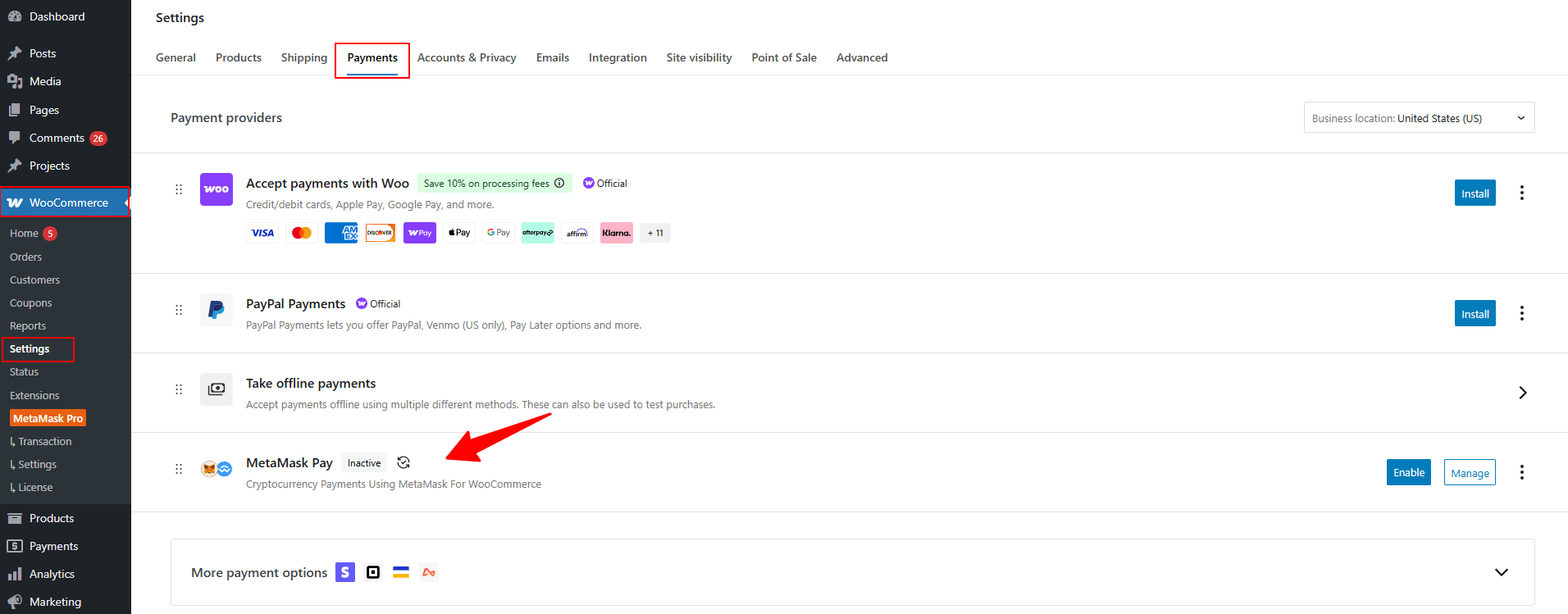
Using the Pay with MetaMask for WooCommerce plugin allows your customers to pay using MetaMask and other supported wallets by configuring the built-in crypto payment gateway.
What is a Payment Gateway?
A payment gateway is the system that allows your WooCommerce store to securely receive payments from customers. Each gateway handles a specific payment method such as credit cards, PayPal, or crypto wallets.
Pay with MetaMask for WooCommerce plugin connects your store to crypto wallets like MetaMask, enabling customers to pay using supported cryptocurrencies and networks.
Enable Payment Gateway
Follow the steps below to enable the WooCommerce MetaMask payment gateway:
- By default, the MetaMask payment gateway is enabled in WooCommerce payment settings.
- If it is not enabled, then:
- From your WordPress dashboard, navigate to WooCommerce > Settings > Payments.
- Enable the Metamask Pay option.