
Using Cryptocurrency Widgets Pro, you can easily create a new widget and display it anywhere on your site using a shortcode.
A shortcode is a simple code snippet that you can insert into your WordPress posts, pages, or widgets to display real-time crypto data. Think of it as a command that tells WordPress, “show my crypto data here in this style, with these specific settings.“
Follow the steps below to create your widget and generate its shortcode:
- From your WordPress dashboard, navigate to Crypto Plugins > Crypto Widget Pro.
- Click Add New Widget.
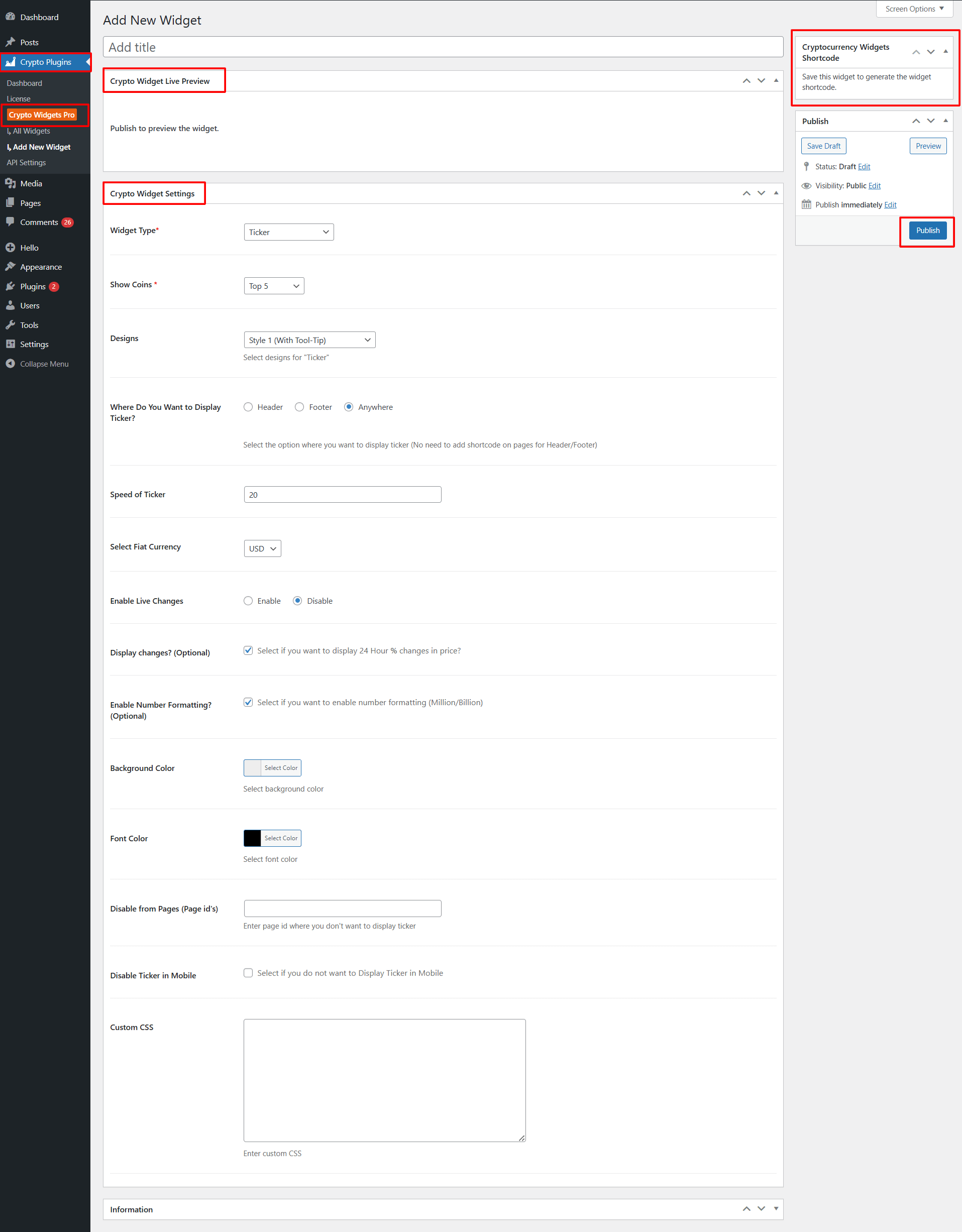
- Crypto Widget Live Preview: The live preview of your widget will appear after you publish it.
- Crypto Widget Settings: Fill in the required fields and customize the widget based on how you want your widget to appear.
- After being satisfied, publish your widget.
- After publishing, a shortcode will be generated. Copy this shortcode and paste it anywhere on your site, pages, posts, sidebars, footers, or page builders.