
Plugin Compatibility
Q1: Does the Refunds via Crypto Wallets feature work with all WooCommerce payment methods?
Ans: No. Refunds via Crypto Wallets only work for orders paid using the Pay With Metamask For WooCommerce plugin. Traditional WooCommerce gateways (PayPal, Stripe, COD, etc.) are not supported.
Q2: Which crypto wallets are compatible with refunds?
Ans: Refunds are supported for any customer using MetaMask or any Web3 wallet that connects through the plugin.
Q3: Can I refund a payment made on any blockchain network?
Ans: Yes. Refunds work on all networks supported by the plugin: Ethereum, Polygon, Binance Smart Chain, Avalanche, etc. However, you must issue the refund on the same network the customer used.
Q5. Does this feature work on test networks?
Ans: Yes. Refunds work on test networks like Sepolia, Polygon Testnet, and BSC Testnet, which is ideal for testing before going live.
Common Issues & Solutions
Q1. Why can’t I see the refund button on the WooCommerce order page?
Ans: This happens if Refunds are not enabled in the plugin settings. Navigate to: WooCommerce > Metamask Pro > Settings > General Settings and enable Allow Refunds option.
Q2. Why is my refund failing or not sending?
Ans: A refund may fail if your admin wallet doesn’t have enough tokens to send back, or if there aren’t enough gas fees available on the selected network. It can also happen when MetaMask is connected to the wrong network or if the original payment was not fully confirmed on the blockchain.
Q4. The customer says they didn’t receive the refund. What should I check?
Ans: If a customer says they didn’t receive the refund, first check the refund transaction hash to confirm it was sent. Make sure the refund went to the same wallet address used during the original payment. Then, verify that the transaction is confirmed on the blockchain explorer, as blockchain confirmations can take a few minutes to appear.
Q5. Why is the refund amount different after sending?
Ans: This usually happens because of gas fees. The refunded token amount stays the same, but gas fees are paid separately from your wallet, this does not affect the customer’s received amount.
Q6. Can I refund using a different token than what the customer paid with?
Ans: No. Refunds must be processed using the same cryptocurrency and network used during the original payment.
License & Account Queries
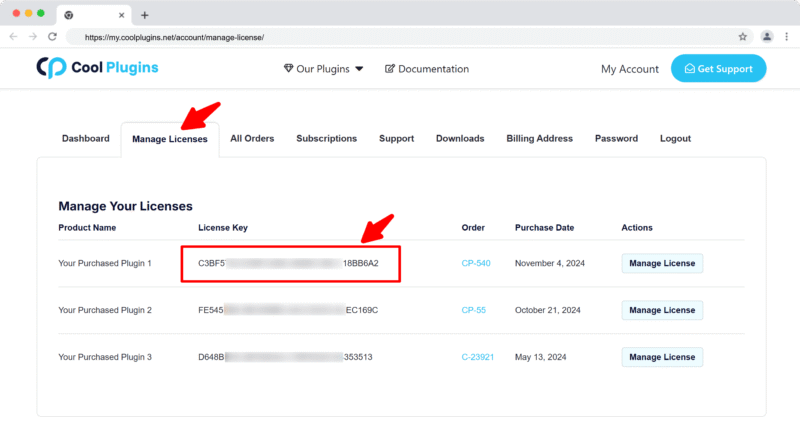
Q1. Where can I find my license key?
Ans. You can find your license key by logging into your account at my.coolplugins.net. Once logged in, navigate to the Manage Licenses section. There, you will see a list of your purchased plugins along with their license keys displayed next to each plugin name.
Q2. How do I activate my license on a site?
Ans. After installing the plugin, go to Crypto Plugins > License in your WordPress dashboard and enter your license key in the License section.
Q3. Can I move my license to a different website?
Ans. Yes, you can transfer your license from one website to another. But to do this, make sure to deactivate the license on your old domain first, and then activate it on the new website.
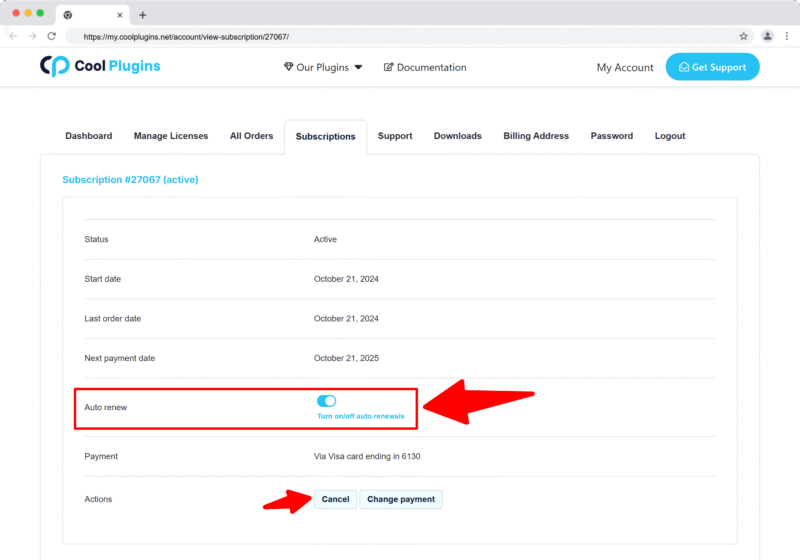
Q4. How can I cancel the auto-renewal of my license key?
Ans. You can cancel the auto-renewal at any time by logging into your account on our website. Go to the Subscriptions section, find your active license, and click on the Cancel Auto-Renewal button. This will stop future charges, but your license will remain active until the end of the current billing period.
Q5. How can I download my invoice?
Ans. To download your invoice, log in to your account on our website. Navigate to the Orders section. Find the order you want the invoice for, and click the Invoice button to download it.
Contact Support
Q1. I need help with an issue not listed here. How can I get support?
Ans. If you have a question or issue not covered in the FAQ, you can contact our support team by logging into your account at my.coolplugins.net and submitting a support ticket. Our team typically responds within 24–48 business hours to help resolve your issue.
Q2. Is support available for free plugin users?
Ans. If you are a free plugin user, you can get help by raising a ticket through the WordPress.org support forum.