General Settings - Pay with MetaMask for WooCommerce

General option settings allow you to customize your payment address, currency conversion API, refund, and order settings

Follow the steps below to access General Options:

  • From your WordPress dashboard, navigate to WooCommerce > MetaMask Pro > Settings > General Options.
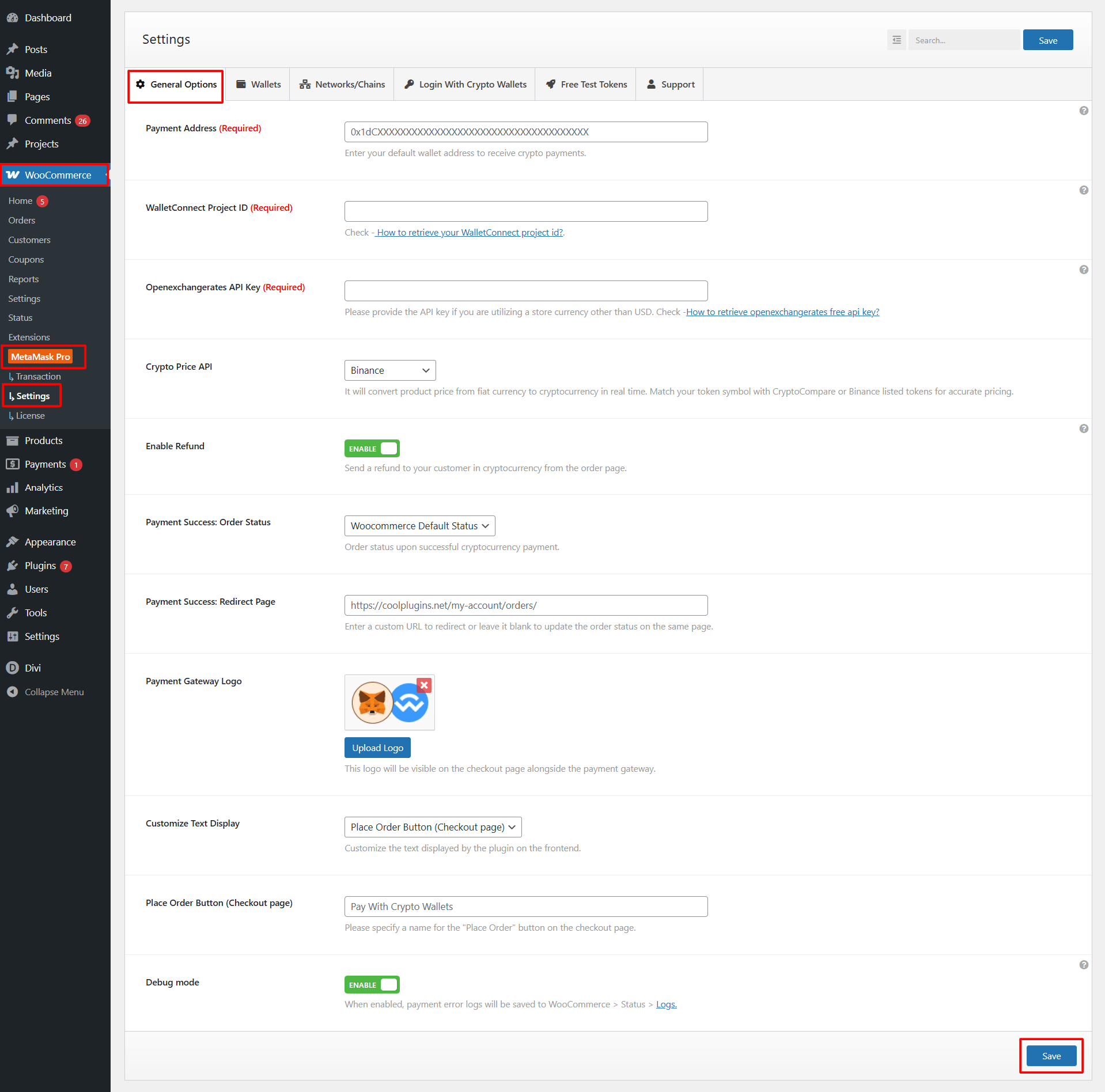
general options pay with metamask for woocommerce
  • Payment Address: Enter the wallet address where you want to receive cryptocurrency payments.
  • WalletConnect Project ID: Enter your WalletConnect Project ID.
  • OpenExchangeRates API Key: If your WooCommerce store uses a currency other than USD, you must enter your OpenExchangeRates API Key to enable accurate price conversions.
  • Crypto Price API: Select the API source you want the plugin to use for converting product prices into cryptocurrency.
  • Enable Refund: Toggle this option to enable crypto refunds directly from the WooCommerce order page.
  • Payment Success: Order Status: Select which WooCommerce order status should be applied automatically after a successful crypto payment.
  • Payment Success: Redirect Page: Enter a custom URL to redirect customers to after a successful crypto payment.
  • Payment Gateway Logo: Upload a custom logo to display with the gateway on the checkout page.
  • Customize Text Display: Choose which frontend text you want to customize.
  • Place Order Button (Checkout Page): Enter the button label that should be displayed on the checkout page.
  • Debug Mode: Enable this option to log detailed payment gateway errors or API responses for debugging.

After configuring all options, click the Save button to apply changes.

Last Updated
Pay With Metamask For Woocommerce Pro

Accept crypto payments seamlessly via MetaMask, WalletConnect, Binance Wallet, and more on WooCommerce.

Need Help? Contact Our Support Team
In This Article
Share it
Pay With Metamask For Woocommerce Pro

Accept crypto payments seamlessly via MetaMask, WalletConnect, Binance Wallet, and more on WooCommerce.

Special offer- only this week

Upto

80%

OFF

OFFER ENDS IN:

D
H
M
S
WordPress Birthday Sale
Celebrate with Big Savings

Offer
ends in:

Days
Hours
Min
Sec

SUPER SALE

up to
80
%

off

UPTO

80% OFF

WordCamp Asia Celebration Sale
Made for WordPress Lovers

SUPER SALE

up to
80
%

off

Offer
ends in:

Days
Hours
Min
Sec

UPTO

80% OFF

save up to 80% off

SUPER SALE

up to
80
%

off

259200

Offer
ends in:

Days
Hours
Min
Sec

Limited Time Special Offer

UP TO 80% OFF

259200

OFFER ENDS IN:

D
H
M
S

Limited Time Special Offer

UP TO 80% OFF

259200

OFFER ENDS IN:

D
H
M
S
Year End Sale
save up to 80% off

Offer
ends in:

Days
Hours
Min
Sec
save up to 80% off

SUPER SALE

up to
80
%

off

Offer
ends in:

Days
Hours
Min
Sec

SPECIAL SALE

SUPER SALE

up to
80
%

off

Offer
ends in:

Days
Hours
Min
Sec
upto
80% off
save up to 80% off

SUPER SALE

up to
80
%

off

Offer
ends in:

Days
Hours
Min
Sec
Independence
Day Sale

SUPER SALE

up to
80
%

off

Offer
ends in:

Days
Hours
Min
Sec

UPTO

80% OFF

Offer
ends in:

Days
Hours
Min
Sec

SUPER SALE

up to
80
%

off

UPTO

80% OFF

Mid-Year Special Sale
save up to 80% off

Offer
ends in:

Days
Hours
Min
Sec
Summer sale
save up to 80% off

Offer
ends in:

Days
Hours
Min
Sec
save up to 80% off

SUPER SALE

up to
80
%

off

Offer
ends in:

Days
Hours
Min
Sec
save up to 80% off

Offer
ends in:

Days
Hours
Min
Sec
save up to 80% off

SUPER SALE

up to
80
%

off

Offer
ends in:

Days
Hours
Min
Sec
New Year Sale
save up to 80% off

Offer
ends in:

Days
Hours
Min
Sec
Christmas
Special Sale

Upto

80%

OFF

Ends in

Days
Hours
Min
Sec

UPTO

80% OFF