
Plugin Compatibility
Q1: Is Cryptocurrency Widgets Pro compatible with all WordPress themes?
Ans: Yes, the plugin works with WordPress themes. If your theme follows standard WordPress coding practices, the widgets will display correctly.
Q2: Does the plugin work with page builders like Elementor, Gutenberg, WPBakery, and Divi?
Ans: Yes. You can use the plugin’s shortcodes inside any page builder, including Elementor, Gutenberg, WPBakery, and Divi.
Q3: Is the plugin compatible with caching plugins?
Ans: Yes, but real-time prices may be delayed if caching is aggressive. We recommend disabling caching on pages where live crypto prices are displayed.
Q4. Does the plugin support WooCommerce?
Ans: The plugin itself does not modify WooCommerce. However, you can place widgets or shortcodes inside WooCommerce product pages or descriptions.
Q5. Can I use the plugin on multisite WordPress installations?
Ans: Yes, the plugin works on WordPress multisite networks without any issues.
Common Issues & Solutions
Q1: The widget is not updating live prices. How do I fix this?
Ans: First, check if the Live Changes option is enabled in your widget settings. If it is already enabled, clearing your website cache or browser cache usually resolves the issue. Some hosting providers also cache pages, so make sure the widget page is not being cached on the server.
Q2: The shortcode is not working and is only showing as text. What should I do?
Ans: This usually happens if the shortcode is not placed inside a proper shortcode block or widget. Make sure you use a shortcode block in Gutenberg or a shortcode widget in Elementor. Also, check if any security plugin is blocking shortcode execution.
Q3: Some cryptocurrencies do not appear in the list.
Ans: This may happen if a coin is new or not included in the default list. You can fix this by manually entering the coin’s ID in the “Add Coin ID” field in the widget settings.
Q4: The widget always shows prices in USD, even when I select another currency.
Ans: Some APIs only provide full data in USD, so those features will default to USD even if you choose another currency. Check your API settings to make sure your selected currency is supported.
Q5: The data is not loading, and I see an API key error.
Ans: This happens when the API key is entered incorrectly or is inactive. Recheck the key you copied, make sure there are no extra spaces, and confirm that your API plan is active. Free API plans may also have limits that temporarily stop data from loading.
License & Account Queries
Q1. Where can I find my license key?
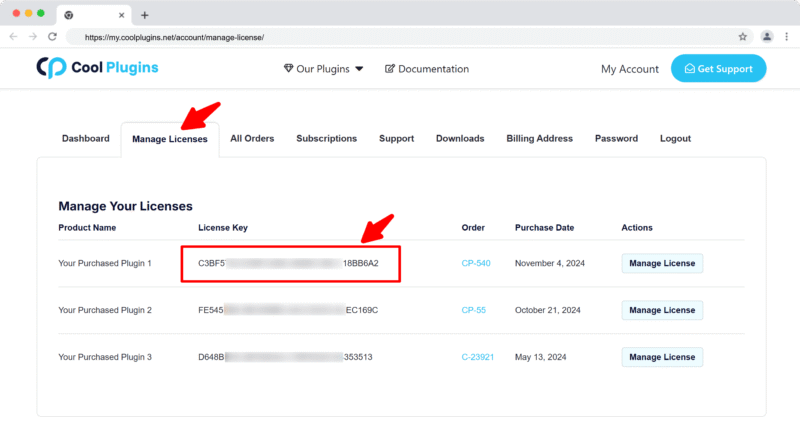
Ans. You can find your license key by logging into your account at my.coolplugins.net. Once logged in, navigate to the Manage Licenses section. There, you will see a list of your purchased plugins along with their license keys displayed next to each plugin name.
Q2. How do I activate my license on a site?
Ans. After installing the plugin, go to Crypto Plugins > License in your WordPress dashboard and enter your license key in the License section.
Q3. Can I move my license to a different website?
Ans. Yes, you can transfer your license from one website to another. But to do this, make sure to deactivate the license on your old domain first, and then activate it on the new website.
Q4. How can I cancel the auto-renewal of my license key?
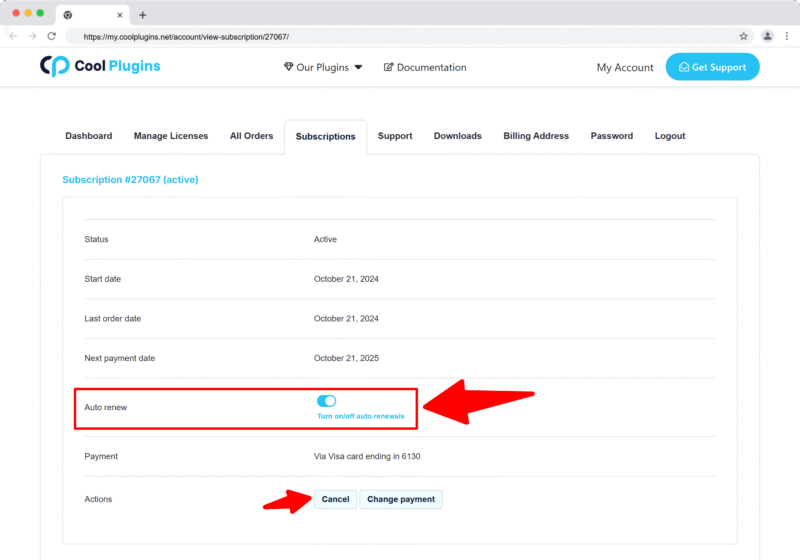
Ans. You can cancel the auto-renewal at any time by logging into your account on our website. Go to the Subscriptions section, find your active license, and click on the Cancel Auto-Renewal button. This will stop future charges, but your license will remain active until the end of the current billing period.
Q5. How can I download my invoice?
Ans. To download your invoice, log in to your account on our website. Navigate to the Orders section. Find the order you want the invoice for, and click the Invoice button to download it.
Contact Support
Q1. I need help with an issue not listed here. How can I get support?
Ans. If you have a question or issue not covered in the FAQ, you can contact our support team by logging into your account at my.coolplugins.net and submitting a support ticket. Our team typically responds within 24–48 business hours to help resolve your issue.
Q2. Is support available for free plugin users?
Ans. If you are a free plugin user, you can get help by raising a ticket through the WordPress.org support forum.