
Want to build a cryptocurrency website like coinmarketcap.com? You can create a professional WordPress site that shows live crypto prices, charts, and exchange data with ease. This blog explains what this website is, how to set it up, its features, and what you get by choosing this solution.
What is a CoinMarketCap Clone Website?
A CoinMarketCap clone website mimics the CoinMarketCap.com. It automatically generates over 2,500 single pages for cryptocurrencies and 250+ pages for exchanges, showing live prices, historical charts, and trading data. It uses the CoinGecko free API to keep information updated in real-time. You can customize it, add donation options, and earn money through ads or affiliate links.
This website is perfect for anyone who wants to share crypto information or start a crypto-related business. It is easy to use, even for beginners, and comes with tools to make your site look professional.
How to Set Up Your CoinMarketCap Clone Website
1. Install WordPress and Required Plugins
Start by setting up WordPress on your domain or a local server.
To build a CoinMarketCap clone website, you’ll need the following plugins:
- Cryptocurrency Widgets Pro
- Coins Marketcap
- Cryptocurrency Exchanges List Pro
- Cryptocurrency Search Addon
2. Create Category Lists for Coins
Organize cryptocurrencies into categories like “DeFi” or “Stablecoins” for easy navigation.
- Go to Crypto Plugins > Coin Marketcap > List Shortcodes > Add New in your WordPress dashboard.
- Create a shortcode for a category (e.g., “Top Gainers”).
- Copy the shortcode and paste it into a new WordPress page.
- Add the page to your menu:
- Go to Appearance > Menus.
- Select the “crypto coins menu.”
- Add your category page and click Save Menu
3. Update Your Website’s Branding
Make your site unique by updating logos, favicons, and content.
- Header/Footer Logo:
- Go to Appearance > Elementor Header & Footer Builder.
- Edit the header or “Bottom-footer” with Elementor to upload your logo.
- Favicon:
- Update the favicon in Appearance > Customize > Site Identity.
- Page Title/Content:
- Open a page and click Edit with Elementor to change titles or content.
4. Add Donation Wallet Addresses
Allow visitors to donate cryptocurrencies to your wallet.
- Go to Crypto Plugins > Crypto Donation Box.
- Enter your wallet addresses for supported cryptocurrencies.
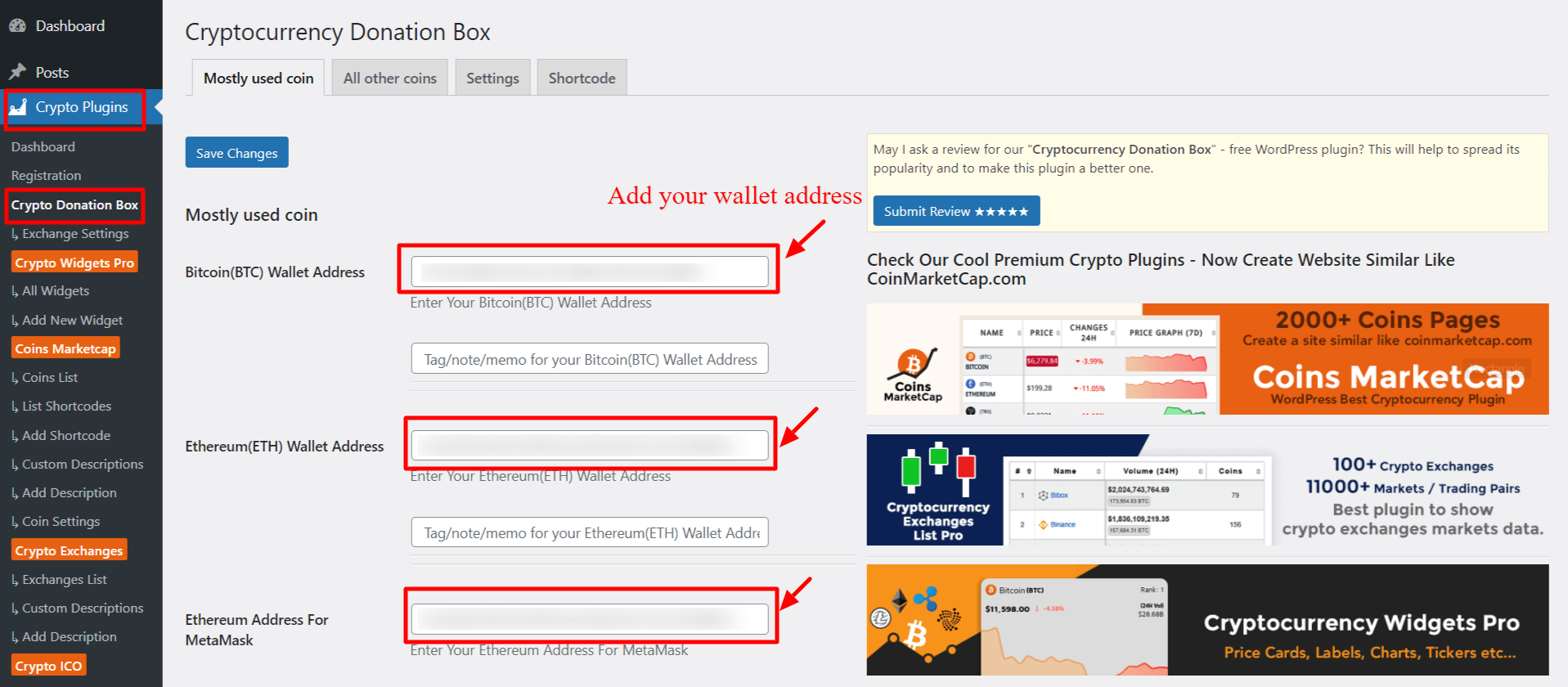
- Click Save Changes to display the donation widget.
The system automatically pulls data from the CoinGecko API, so you don’t need to manually add coins or exchange information. Your site will show live prices, charts, and trading data for over 2,500 cryptocurrencies and 250 exchanges.
Features of the CoinMarketCap Clone Website:
- 2,500+ Coin Pages: Automatically creates pages for 2,500+ cryptocurrencies with live prices, charts, and exchange info.
- 4,500+ Crypto List: Displays a complete list of over 4,500 cryptocurrencies for users to browse.
- 250+ Exchange Pages: Generates detailed pages for 250+ crypto exchanges with trading volume and coin data.
- Smart Search Tool: Includes a search box to easily find any coin or exchange.
- Crypto Portfolio Builder: Allows users to create an account and track their crypto investments.
- Monetization Options: Add affiliate links and ads to earn money from your site.
- Multi-Currency Support: Shows prices in over 30 fiat currencies like USD, EUR, INR, etc.
- Top Gainers & Losers: Highlights the best and worst-performing cryptocurrencies in real-time.
- Live Data Updates: Uses CoinGecko API to keep prices, charts, and data up to date automatically.
- Easy Customization: Change logos, menus, and content using Elementor and add donation wallets.
Launch Your Own Crypto Site With CoinMarketCap Clone Website Setup
Get a complete cryptocurrency website set up on your domain with our CoinMarketCap Clone Website Setup. It includes everything you need to build a powerful crypto tracking platform like CoinMarketCap.com. Simply choose our setup service, and our developer will create a fully customized CoinMarketCap-style website for you.
What You’ll Get:
- Complete Website Installation
Professional setup on your domain by expert developers. - Premium Plugins Included
- Coins Marketcap – Auto-generates 2,500+ coin pages and 4,500+ coin lists.
- Cryptocurrency Widgets Pro – Show dynamic crypto widgets across your site.
- Cryptocurrency Exchanges List Pro – Builds 250+ exchange pages with trading data.
- Cryptocurrency Search Addon – Adds instant search for coins and exchanges.
- Coins Marketcap – Auto-generates 2,500+ coin pages and 4,500+ coin lists.
Get the CoinMarketCap clone website setup and launch your website today.