
Cryptocurrency Exchanges List Pro is a powerful WordPress plugin that uses third-party APIs to gather real-time data on market pairs and trading volume from over 250 cryptocurrency exchanges. Easily customize exchange pages with shortcodes, add explanations for SEO, and provide features like exchange comparisons and multi-fiat support.
Download & Install Cryptocurrency Exchanges List
After purchasing the Cryptocurrency Exchanges List, follow these steps to download your plugin:
- Log in to your account at my.coolplugins.net.
- Download the plugin
.zipfile.

- You will receive your license key via email. You can also find it in your “Manage your Licenses” tab.
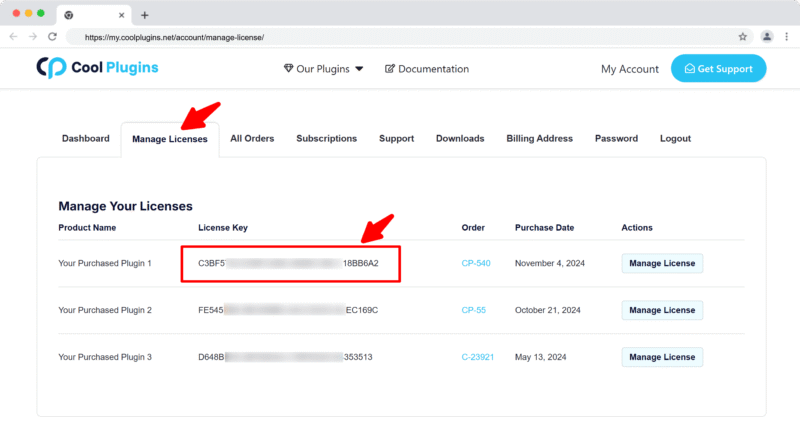
Note: The license key is required to activate Pro features. Make sure you enter a valid email during purchase.
Install via WordPress Admin
- Log in to the WordPress Admin panel.
- From the left menu panel, go to Plugins >> Add New >> Upload to install the plugin.
- Click Upload.
- From here choose the file you just purchased and downloaded, and make sure the file is in (.zip) format.
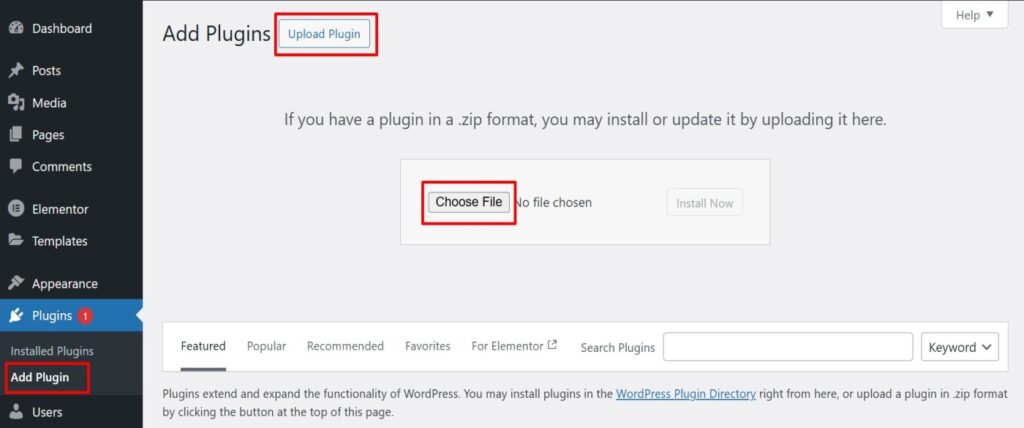
- Click Install Now & activate the plugin after installation.
Install via FTP Account
If you prefer using FTP to install the plugin:
- To install the plugin, use your FTP software and browse to the wp-content/plugins folder.
- Extract the main plugin file (.zip) to the folder and upload it to the server.
- Once it’s uploaded, go to your WordPress Admin panel and browse to Plugins >> Installed Plugins.
- Click the Activate link.