Plugin Compatibility
Q1. Is the Cryptocurrency Exchanges List plugin compatible with all WordPress themes?
Ans: Yes, the plugin works smoothly with almost all modern WordPress themes. If your theme follows standard WordPress coding practices, the exchange list, tables, and single pages will display correctly.
Q2. Does the plugin work with page builders like Elementor, Divi, or Gutenberg?
Ans: Absolutely. You can use the plugin with Elementor, Divi, Gutenberg, or any other builder. Simply paste the provided shortcodes into your builder page, and the exchange list will display without issues.
Q3. Can I use this plugin along with other crypto-related plugins?
Ans: Yes, the plugin is lightweight and coded to avoid conflicts. In most cases, it works fine with other crypto plugins. If you notice any layout issues, simply test by disabling the conflicting plugin.
Q4. Does the plugin require WooCommerce or any other addon to work?
Ans: No additional plugins are required. It works independently after activation.
Common Issues and Solutions
Q1. The exchange list shortcode is not showing anything, what should I do?
Ans: This usually happens if the API is not loading or the page cache is active. Clear your website cache, refresh the page, and make sure your API settings are correctly configured.
Q2. My custom single exchange page is not opening. What am I missing?
Ans: Ensure that you have selected the correct single page in the plugin settings. Also, check if permalinks are set to “Post name” and then click Save Changes to refresh WordPress rewrite rules.
Q3. The exchange list loads slowly. How can I improve speed?
Ans: Slow loading usually occurs when the site fetches a large amount of live data. Use a WordPress caching plugin so the data doesn’t load from scratch every time.
Q4. The icons or logos are not appearing. What should I do?
Ans: This happens if the exchange doesn’t provide a logo or your theme blocks external images. You can upload a custom logo from the exchange settings page inside the plugin.
License & Account Queries
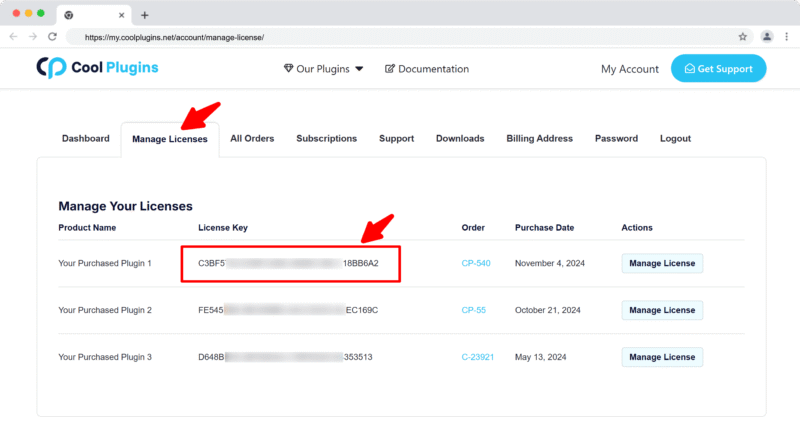
Q1. Where can I find my license key?
Ans. You can find your license key by logging into your account at my.coolplugins.net. Once logged in, navigate to the Manage Licenses section. There, you will see a list of your purchased plugins along with their license keys displayed next to each plugin name.
Q2. How do I activate my license on a site?
Ans. After installing the plugin, go to Crypto Plugins > License in your WordPress dashboard and enter your license key in the License section.
Q3. Can I move my license to a different website?
Ans. Yes, you can transfer your license from one website to another. But to do this, make sure to deactivate the license on your old domain first, and then activate it on the new website.
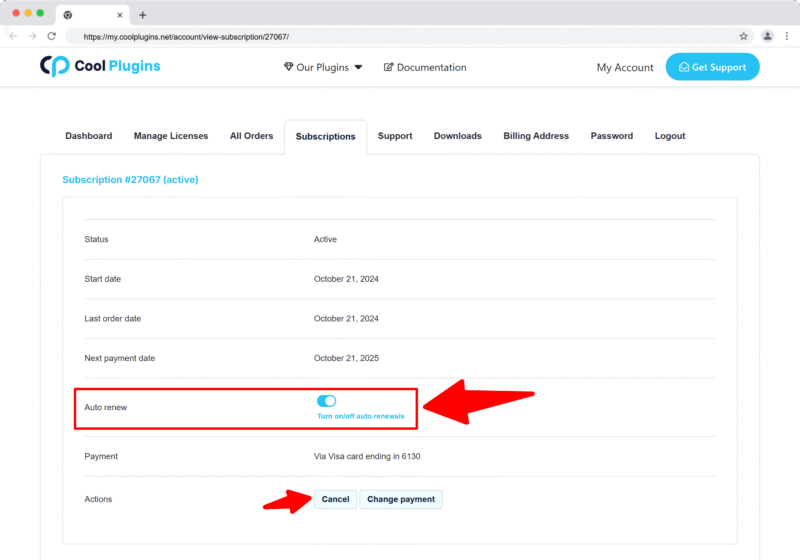
Q4. How can I cancel the auto-renewal of my license key?
Ans. You can cancel the auto-renewal at any time by logging into your account on our website. Go to the Subscriptions section, find your active license, and click on the Cancel Auto-Renewal button. This will stop future charges, but your license will remain active until the end of the current billing period.
Q5. How can I download my invoice?
Ans. To download your invoice, log in to your account on our website. Navigate to the Orders section. Find the order you want the invoice for, and click the Invoice button to download it.
Contact Support
Q1. I need help with an issue not listed here. How can I get support?
Ans. If you have a question or issue not covered in the FAQ, you can contact our support team by logging into your account at my.coolplugins.net and submitting a support ticket. Our team typically responds within 24–48 business hours to help resolve your issue.