The API Settings panel allows you to connect Cryptocurrency Widgets Pro with your preferred cryptocurrency data provider. Once the plugin is installed and activated, configure your API keys to ensure your widgets display accurate and real-time market data.
Follow the steps below to access API settings:
- From your WordPress dashboard, navigate to Crypto Plugins > Coins MarketCap > API Settings.
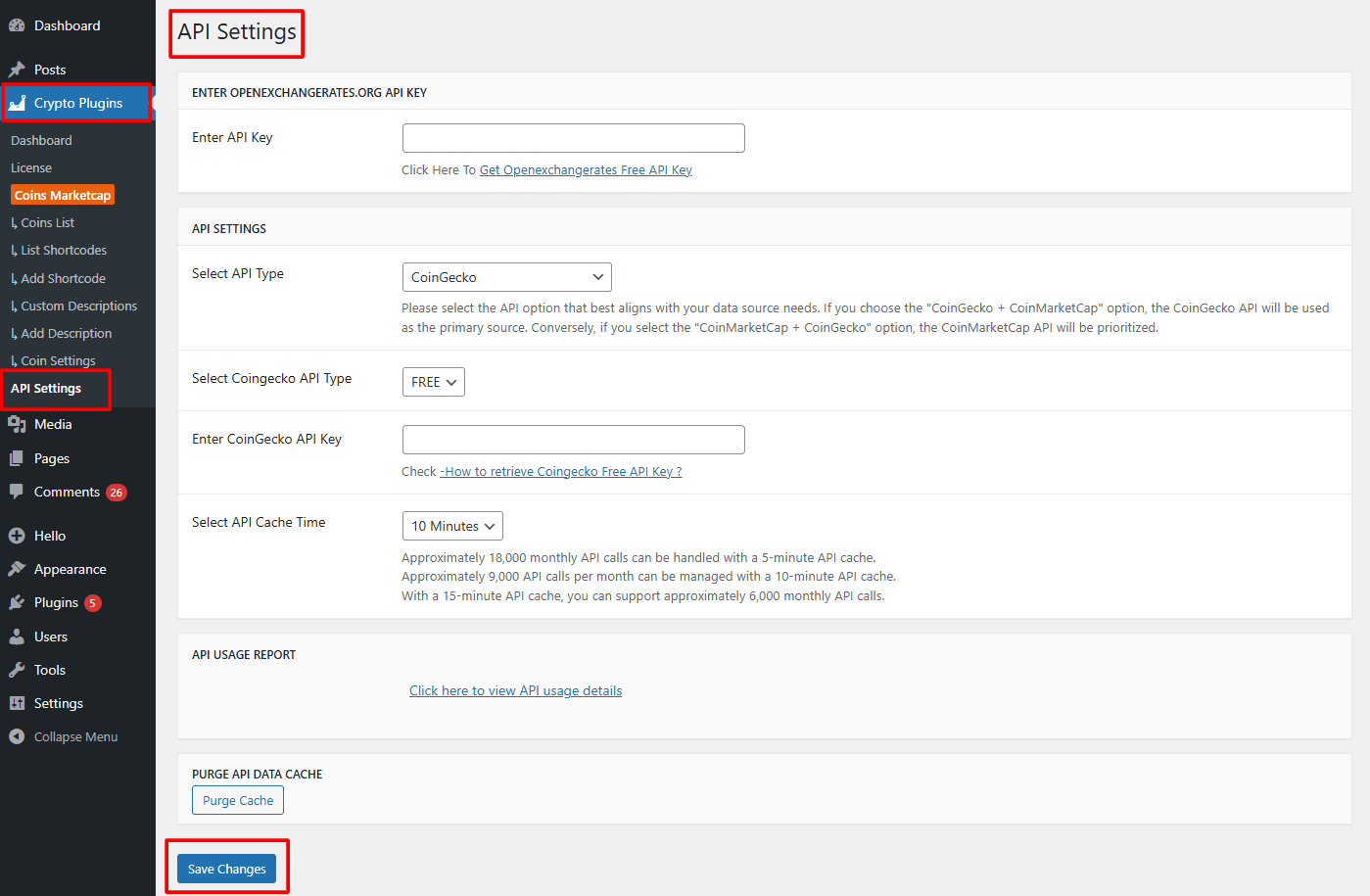
- OpenExchange API Key: If you want to use currency conversion inside your widgets, enter your OpenExchange API Key in the provided field.
- From API Settings:
- Select API: Choose the API from where you want the plugin to fetch cryptocurrency prices: Coingecko, CoinMarketCap API, Coingecko + CoinMarketCap, CoinMarketCap + Coingecko.
- Select API Cache Time: Use the API Cache Time setting to decide how often the plugin should refresh cryptocurrency data.
- API Usage Report: A dedicated link is provided to quickly check your API usage and request limits on your selected provider’s dashboard.
- Purge API Data Cache: The Purge API Data Cache option allows you to instantly clear all stored cryptocurrency data that the plugin has cached.
- After satisfied, click Save Changes to apply your settings.