
The Coins MarketCap plugin is a powerful plugin for integrating live cryptocurrency market data into WordPress websites. It connects to a third-party API to generate an automatic crypto price listing that includes real-time value, market cap, tickers, and charts.
Download & Install Coins MarketCap
After purchasing Coins MarketCap, follow these steps to download your plugin:
- Log in to your account at my.coolplugins.net.
- Download the plugin
.zipfile.

- You will receive your license key via email. You can also find it in your “Manage your Licenses” tab.
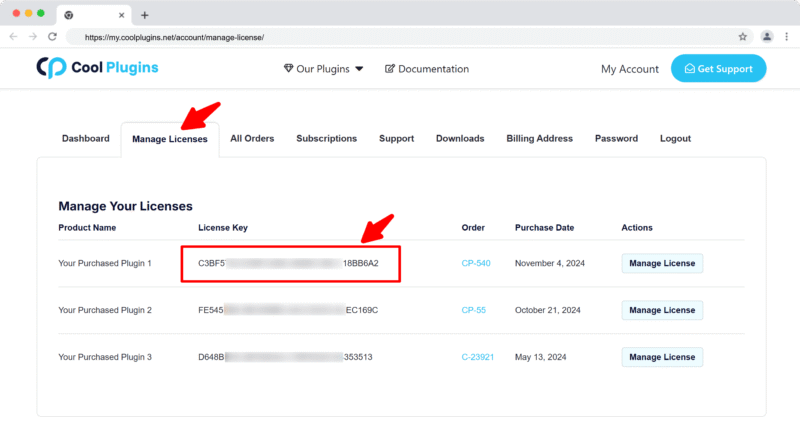
Note: The license key is required to activate Pro features. Make sure you enter a valid email during purchase.
Install via WordPress Admin
- Log in to the WordPress Admin panel.
- From the left menu panel, go to Plugins >> Add New >> Upload to install the plugin.
- Click Upload.
- From here choose the file you just purchased and downloaded, and make sure the file is in (.zip) format.
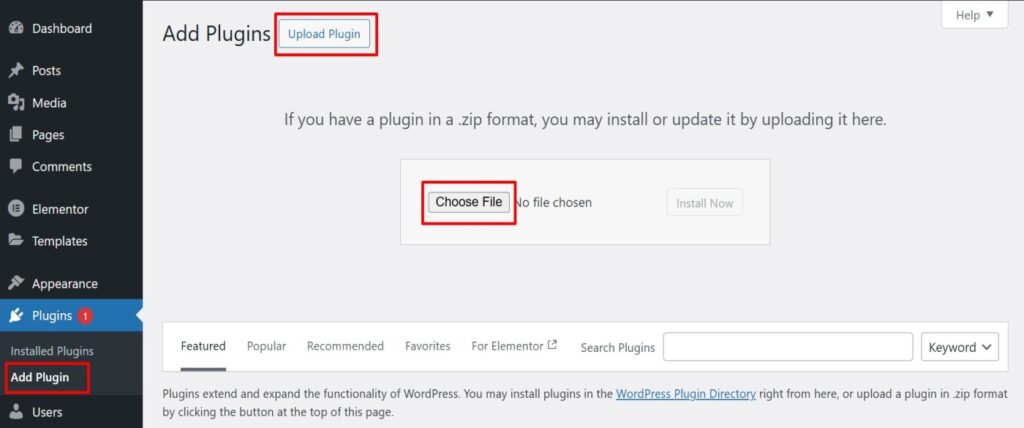
- Click Install Now & activate the plugin after installation.
Install via FTP Account
If you prefer using FTP to install the plugin:
- To install the plugin, use your FTP software and browse to the wp-content/plugins folder.
- Extract the main plugin file (.zip) to the folder and upload it to the server.
- Once it’s uploaded, go to your WordPress Admin panel and browse to Plugins >> Installed Plugins.
- Click the Activate link.